Web panel (preview)
The web panel lets people register, get their API key and set up OpenCode from
the browser, and gives administrators a live view of the service. It is a
preview: it lives in
web/, is covered by
tests/test-web.sh, and has been used in one classroom on a GB10, but its
options and layout may still change. Without the panel, keys come from
scripts/gen-api-keys.sh as described in HTTPS proxy, and both
kinds of key work side by side.
The panel is one Python file using the standard library only, with one SQLite
file. It runs in a stock Python container, listens on 127.0.0.1:8090 and is
reached through the nginx proxy only.
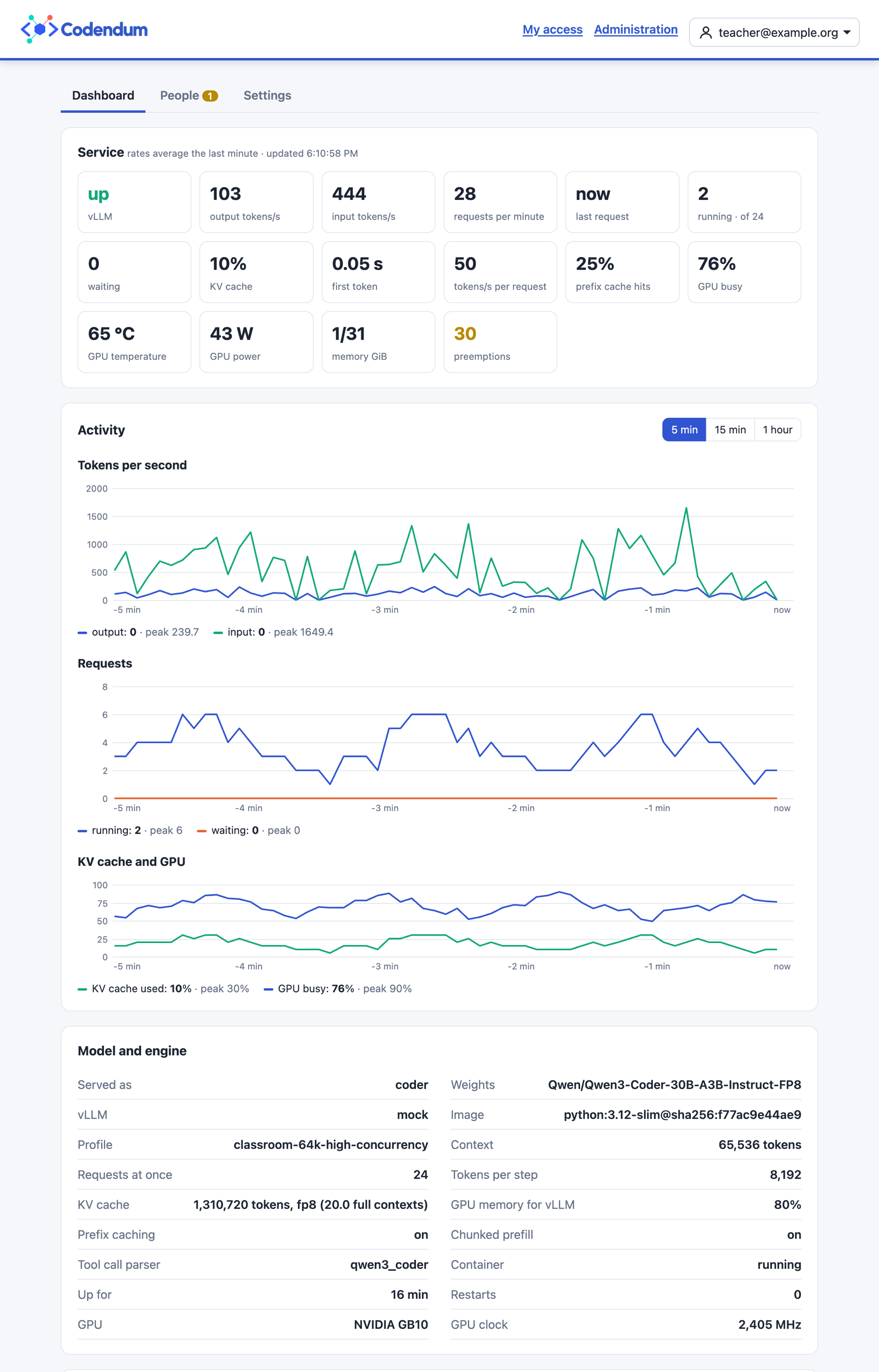
Screenshots on this page come from the test setup, with example accounts, a mock vLLM and a simulated GPU: the figures are not measurements.
For the people using it
Register with an e-mail address. The form says at once if the address is invalid, already registered or outside the allowed domains.
Wait for approval, unless the domain is approved automatically.
Follow the three steps on the personal page:
install OpenCode with the official command for the workstation;
run a one-time setup command, valid for 10 minutes, that saves the certificate and the key and adds the
codendumprovider to OpenCode;start OpenCode.
The personal page also links to the chat, if there is one, and shows the API key, which people can renew. The profile menu in the header leads to the password change; changing the password logs out the person’s other sessions.
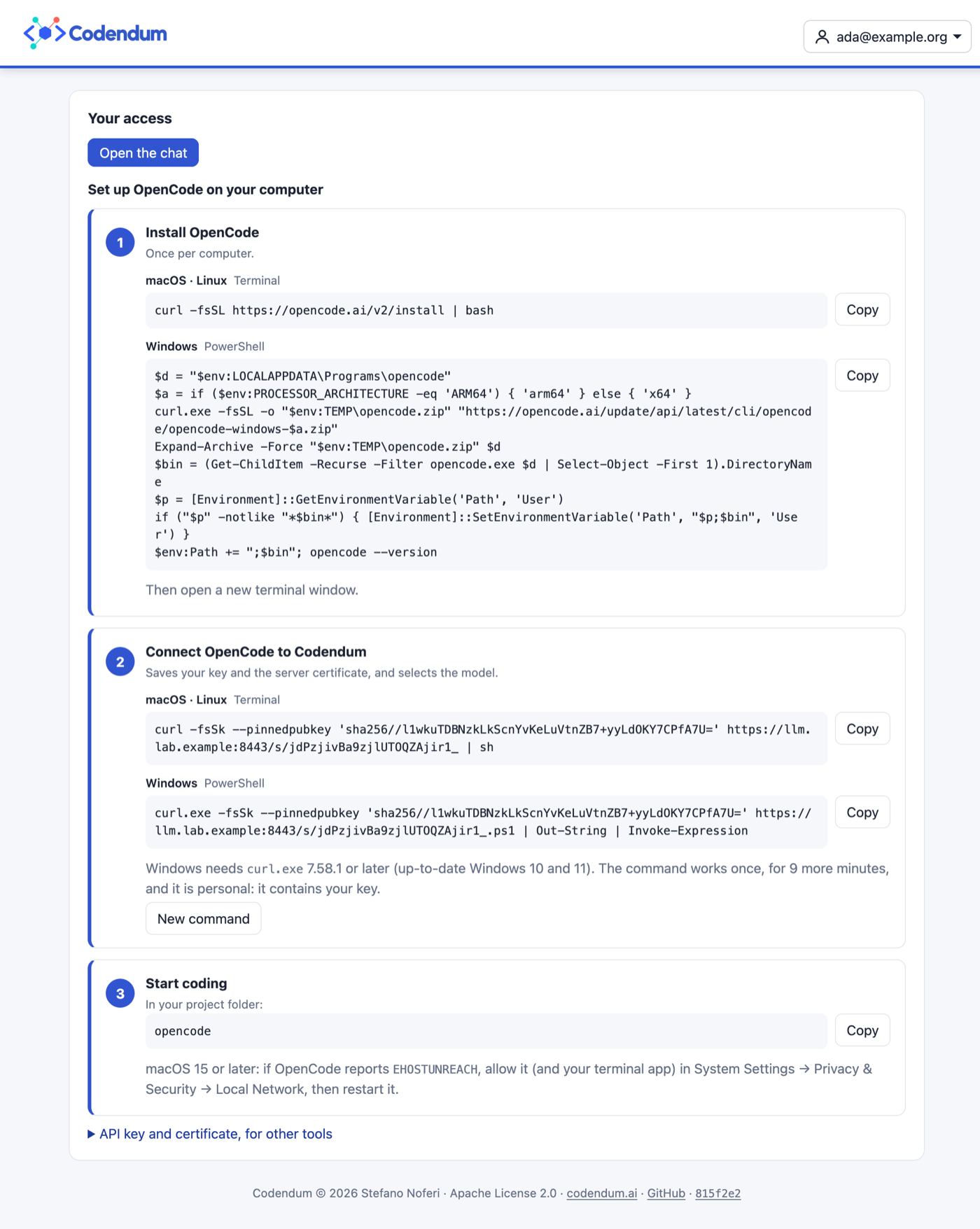
The setup command needs no repository copy and no Python on the workstation:
curl -fsSk --pinnedpubkey 'sha256//…' https://llm.lab.example:8443/s/CODE | sh                            # macOS, Linux
curl.exe -fsSk --pinnedpubkey 'sha256//…' https://llm.lab.example:8443/s/CODE.ps1 | Out-String | Invoke-Expression  # Windows
--pinnedpubkeymakes curl accept only the proxy’s public key, so the script cannot be replaced on the network even before the workstation trusts the certificate;-konly skips the CA check.The key is not in the URL: the script is generated when the code is used.
The scripts save the certificate and the key in
~/.config/codendum/, with the key in a private file that OpenCode reads through{file:…}. They back up the OpenCode configuration before changing it, setNODE_EXTRA_CA_CERTSand send a test request.
Tested with OpenCode 2.0.32 on macOS and with a simulated Linux workstation.
The Windows script has not been tested on a real Windows workstation yet; it
needs curl.exe 7.58.1 or later, as shipped in up-to-date Windows 10 and 11.
On macOS, the terminal running OpenCode may ask for the Local Network
permission the first time; allow it, or requests to the GB10 fail.
For administrators
The first administrator is created through a one-time link printed in the panel log. Administrators can grant the role to others. The administration has three pages.
Dashboard (/admin), refreshed every 5 seconds:
tiles averaged over the last minute: tokens per second, requests, time to first token, tokens per second for each request and the time of the last request; requests running and waiting, KV cache, prefix cache hits, GPU utilisation, temperature and power, host memory, preemptions;
charts of the last 5 minutes, 15 minutes or hour, with the peak of the range (vLLM is sampled every 5 seconds and the last hour is kept in memory);
the model and the engine: served name, weights, vLLM version, image, profile, context, requests at once, KV cache size and type, GPU memory share, prefix caching, container state, uptime and restarts, GPU name and clock;
totals since vLLM started: requests, tokens, how requests ended (finished normally, cut at the output limit, aborted) and mean latencies;
people, and who made the most API requests in the last 10 minutes.
People (/admin/people): approve one or all, block, unblock, delete,
renew keys, reset passwords, grant or remove the administrator role. A
password reset shows a random password once and logs the person out
everywhere; there is no e-mail delivery.
Settings (/admin/settings):
registration open or closed;
the e-mail domains allowed to register, optionally approved at once;
a notice shown at the top of every personal page;
web search in the chat, when the panel is connected to Open WebUI.
Installation
Run these steps between sessions, not during a class. The commands use the
default proxy directory of start-proxy.sh, /etc/codendum/proxy
(CODENDUM_PROXY_DIR), and keep the panel data next to it.
1. Prepare the data directory and the proxy. patch-nginx.py makes the key
map include api-keys-web.map, written by the panel, and lets location /
proxy to the panel instead of answering 404. It writes a backup
codendum.conf.bak first, and running it twice changes nothing:
cd ~/codendum
sudo install -d -m 0700 /etc/codendum/web
sudo web/patch-nginx.py /etc/codendum/proxy/conf.d/codendum.conf
scripts/start-proxy.sh --reload
2. Start the panel container:
docker run -d --name codendum-web --restart unless-stopped --network host \
  -v ~/codendum:/codendum:ro -v /etc/codendum/proxy:/proxy -v /etc/codendum/web:/data \
  -v /var/run/docker.sock:/var/run/docker.sock \
  -e CODENDUM_WEB_DB=/data/web.sqlite -e CODENDUM_WEB_MAP=/proxy/api-keys-web.map \
  -e CODENDUM_WEB_PROXY_CONTAINER=codendum-proxy \
  -e CODENDUM_WEB_ACCESS_LOG=/proxy/logs/codendum.access.log \
  -e CODENDUM_WEB_API_URL='https://{host}:8443' -e CODENDUM_WEB_CHAT_URL='https://{host}/' \
  python:3.12-slim@sha256:f77ac9e44ae96ef2c90b8053ea08c31f8be030f824196b0ae4db6d462c84e51f \
  python3 /codendum/web/codendum_web.py
{host} stays as written: the panel fills it with the host name each browser
used. Drop CODENDUM_WEB_CHAT_URL if there is no Open WebUI.
3. Create the first administrator with the link from the log, replacing
HOST with the host name:
docker logs codendum-web | grep setup=
The link works once. Until an administrator exists, a new link is printed at every start, and everyone else who registers waits for approval.
After a boot, the API answers 502 until vLLM has loaded the model, and the dashboard shows vLLM as down meanwhile.
To remove the panel, stop and remove the container, restore
codendum.conf.bak, and run scripts/start-proxy.sh --reload.
Settings
Variable |
Default |
Purpose |
|---|---|---|
|
|
Address of the panel |
|
|
SQLite file |
|
|
nginx key map written by the panel |
|
empty |
Proxy container reloaded through the Docker socket after the map changes |
|
empty |
Alternative: command run after the map changes |
|
|
Docker Engine API socket |
|
|
vLLM metrics; |
|
|
vLLM container read for the dashboard; empty turns it off |
|
empty |
Proxy access log, for per-user requests |
|
|
API URL shown to users |
|
empty |
Chat URL shown to users |
|
empty |
Open WebUI on loopback, for the panel itself |
|
|
Proxy certificate chain, for the pin and |
Open WebUI
Open WebUI can use the panel’s accounts, so that
people log in once and the administrators of the panel are the administrators
of the chat. /auth/verify answers nginx auth_request with
X-Codendum-Email, X-Codendum-User and X-Codendum-Role (admin or
user) for approved accounts, and 401 for everyone else. patch-nginx.py does not write this
part yet; in the location that proxies Open WebUI:
auth_request /_codendum_verify;          # internal location → panel /auth/verify
auth_request_set $codendum_email $upstream_http_x_codendum_email;
auth_request_set $codendum_name  $upstream_http_x_codendum_user;
auth_request_set $codendum_role  $upstream_http_x_codendum_role;
# Always overwritten, never the ones sent by the client.
proxy_set_header X-Codendum-Email $codendum_email;
proxy_set_header X-Codendum-User  $codendum_name;
proxy_set_header X-Codendum-Role  $codendum_role;
Open WebUI (checked with 0.12.0) then needs
WEBUI_AUTH_TRUSTED_EMAIL_HEADER=X-Codendum-Email,
WEBUI_AUTH_TRUSTED_NAME_HEADER=X-Codendum-User and
WEBUI_AUTH_TRUSTED_ROLE_HEADER=X-Codendum-Role, and must listen on loopback
only: anyone who reaches it directly can send these headers. Set the headers
in nginx before Open WebUI trusts them. Open WebUI applies the role at each
sign-in.
With CODENDUM_WEB_OPENWEBUI_URL (for example http://127.0.0.1:3000), the
panel also signs in to Open WebUI with the same headers:
a role change (granting or removing the administrator role, blocking or deleting an administrator) applies at once instead of at the next chat login;
the settings page turns web search in the chat on or off (
ENABLE_WEB_SEARCH), acting as the administrator who uses the page.
Security
Sessions and forms. The session cookie is
HttpOnlyandSameSite=Strict, and expires after 12 hours. Every form that changes something also carries a token derived from the session (CSRF protection).Failed logins are limited to 5 per user name and client address, and 30 per client address, in 10 minutes. The second limit is generous because a classroom often shares one address.
Keys are written only to the key map, with mode 0600, and the proxy is reloaded with
nginx -s reload.The Docker socket gives the panel control over Docker. The panel uses it to reload the proxy, to read a few serving options, the state and the image of the vLLM container (never its environment, which may hold secrets) and to run one
nvidia-smi --query-gpuin it every 5 seconds. This is acceptable on a dedicated host, but it is the main point to revisit before the panel leaves the preview.Nothing new is exposed.
/metricsstays on loopback, and the dashboard data (/api/status) is for administrators only.